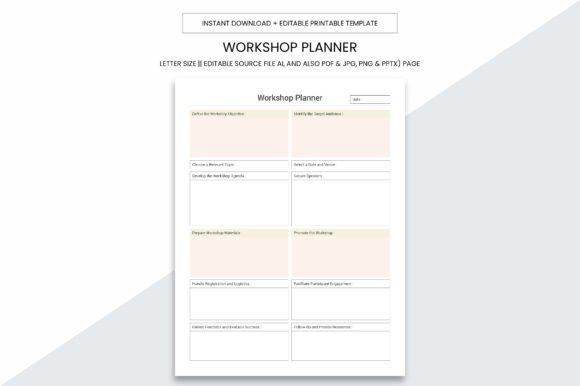
Workshop Planner Kdp Interior
The Workshop Planner Kdp Interior is a purpose-built, production-ready interior file designed for creators who need a functional, professional-grade planner layout—whether for personal use, client-facing workshops, or commercial publishing via Amazon KDP. It’s not just another printable PDF; it’s a carefully engineered digital asset that bridges planning, execution, and distribution in one cohesive package.
Where It Fits in Your Workflow
This interior serves as the structural backbone of any workshop-focused notebook—before you finalize cover design, before you upload to KDP, and long before your first customer opens the spine. It’s what sits between your idea and a shipped product—or between your daily workflow and a tangible logbook that supports real decisions.
For educators preparing a hands-on training session, the Workshop Planner Kdp Interior becomes the scaffold for participant reflection, activity tracking, and skill mapping—pages are laid out to prompt action, not just record it. For freelancers running client workshops, it functions as both a live facilitation tool and a post-session deliverable. And for KDP publishers, it’s the verified, print-optimized interior that eliminates formatting rework, reduces rejection risk, and accelerates time-to-market.
Practical Design That Supports Real Use
At 8.5 x 11 inches with no bleed, the size balances usability and compatibility. It fits standard US letter paper, most home printers, and commercial print providers—no scaling, no cropping, no guesswork. The absence of bleed means margins remain consistent whether printed single-sided for quick notes or double-sided for a bound workbook. This isn’t theoretical convenience—it’s tested reliability across environments: a coffee shop laptop, a shared office printer, or a bulk print run at a local copy shop.
All pages render cleanly at 300 PPI—a non-negotiable for crisp text, legible checkboxes, and sharp line art. That resolution ensures scanned handwritten entries retain clarity, and printed diagrams (like process flows or timeline grids) stay precise under close review. If your workflow includes annotating digitally, the high-DPI source files prevent pixelation when zoomed in on tablets or stylus-enabled devices.
Digital Flexibility Without Compromise
You receive editable source files in Adobe Illustrator (.ai), plus layered PDF, JPG, PNG, and even PPTX formats. That means you’re not locked into one tool or one output path. Need to adjust header fonts for brand alignment? Open the .ai file. Want to extract a single page as a slide for a team briefing? Use the PPTX. Prefer to annotate directly in Acrobat? The PDF is fully layered and tagged for accessibility and editing.
This flexibility matters most during iteration. Say you’re refining a workshop module based on beta feedback—you can revise a single worksheet without rebuilding the entire 109-page interior. Or if you’re repurposing content for a different audience (e.g., shifting from corporate training to student-led project planning), you can swap out templates while keeping consistent margins, typography, and pagination.
Ready for KDP—Without the Usual Headaches
The included 109-page PDF is pre-formatted for Amazon KDP: correct trim size, embedded fonts, CMYK-safe colors, and optimized compression. No last-minute fixes needed before upload. You avoid common pitfalls like margin warnings, image resolution alerts, or inconsistent page numbering—issues that delay publishing and fracture momentum.
But readiness goes beyond technical compliance. Each page is designed with KDP’s physical constraints in mind: gutter space accommodates binding, headers and footers avoid the trim zone, and interactive elements (like checkboxes or date fields) sit well within safe zones for both printing and handwriting. That attention to detail translates directly into fewer customer complaints about missing content or misaligned layouts—and more five-star reviews focused on utility, not formatting flaws.
Integration With Tools You Already Use
The Workshop Planner Kdp Interior doesn’t replace your existing stack—it slots into it. Pair it with Notion for digital-first planning: export key worksheets as PDFs, embed them in project dashboards, and link back to printed versions for offline sessions. Use it alongside Canva to customize covers—match color palettes, reuse icons, or pull typography specs directly from the Illustrator file. For teams using Google Workspace, share the PPTX version as a collaborative template for co-facilitation prep, then lock edits once finalized and export to PDF for distribution.
If you’re building a course or membership site, treat individual pages as modular assets. A “Session Reflection” spread becomes a downloadable worksheet in Module 3. A “Resource Tracker” page becomes a bonus download for subscribers. Because the source files are editable, you’re not copying and pasting—you’re adapting intentionally.
Long-Term Usability and Consistency
Consistency isn’t just visual—it’s behavioral. When the same layout repeats across sessions (e.g., a standardized debrief grid or goal-setting flow), users build muscle memory. They know where to record outcomes, where to flag blockers, and how to compare progress across time. That predictability lowers cognitive load and increases follow-through.
The 109-page count reflects intentional pacing—not filler. It includes spaced repetition prompts, multi-week planning spreads, and blank journaling zones, but avoids over-engineering. There’s room to breathe, to cross out, to add marginalia. That balance supports long-term use: a planner that stays useful after month three, not just week one.
Preparation Tips Before You Print or Publish
Before sending to print or KDP, test one critical page: print the first interior page double-sided on plain paper, fold it in half, and hold it up to a light. Check gutter alignment—if text disappears near the spine, adjust margins slightly in the .ai file. Also verify font embedding in the PDF: open Properties > Fonts in Acrobat and confirm all fonts show as “Embedded Subset.”
If you’re customizing for a client or team, rename layers in Illustrator before editing (e.g., “Client_Name_Header” instead of “Layer 1”). It saves hours later when handing off files or revisiting projects months down the line. And always keep a master unedited copy of the original .ai and PDF—version control prevents accidental overwrites during rapid iteration.
Real Implementation Examples
- Freelance Facilitator: Uses the “Workshop Prep Checklist” spread to align objectives, materials, and timing two weeks before delivery—then prints the “Participant Feedback” page on-site for live collection.
- KDP Publisher: Imports the full 109-page PDF into Kindle Direct Publishing, pairs it with a custom cover built in Canva, and launches a niche “Remote Team Workshop Planner” within 48 hours of final approval.
- Educator: Extracts the “Skill Mapping Grid” as a standalone PDF, uploads it to their LMS, and assigns it as a pre-work exercise—students complete it digitally, then bring printed copies to class for group critique.
- Small Business Owner: Prints the “Quarterly Process Audit” spread each January, fills it by hand during strategy review, and scans it into a shared drive as a baseline for next year’s goals.
None of these uses require learning new software or overhauling systems. They rely on clarity of structure, fidelity of output, and respect for real-world constraints—exactly what the Workshop Planner Kdp Interior delivers.
Final Note on Quality Control
Because this interior is built for both digital and physical use, quality control happens at multiple points: visually (checking alignment and contrast), technically (verifying DPI and embeds), and experientially (testing handwriting legibility on printed samples). Run one test print before bulk runs—even on basic paper. If checkboxes feel cramped or lines blur when written over, go back to the .ai file and widen stroke weights or increase spacing. Small adjustments here prevent frustration downstream.
When your tools support your thinking—not distract from it—the work gets clearer, faster, and more repeatable. The Workshop Planner Kdp Interior is built for that kind of quiet reliability.