Travel Planner Canva KDP Interior
Planning a trip shouldn’t mean wrestling with clunky software, printing mismatched pages, or starting from scratch every time. The Travel Planner Canva KDP Interior solves that—cleanly, flexibly, and beautifully. It’s a professionally designed, fully editable interior template built specifically for creators selling travel planners on Amazon KDP—or anyone who wants a polished, print-ready planner they can personalize in minutes.
This isn’t a static PDF you’re stuck with. Every page is built for Canva: fonts, colors, spacing, icons, photo placeholders—even layout structure—are yours to adjust. Whether you're tailoring it for a luxury European getaway guide, a minimalist backpacker journal, or a family road trip companion, the flexibility is real. And because it’s optimized for KDP’s 8.27 × 11.69 inches (A4+) trim size with no bleed, your final print looks crisp, aligned, and bookstore-ready—no guesswork, no last-minute cropping disasters.
What Makes This Travel Planner Canva KDP Interior Stand Out
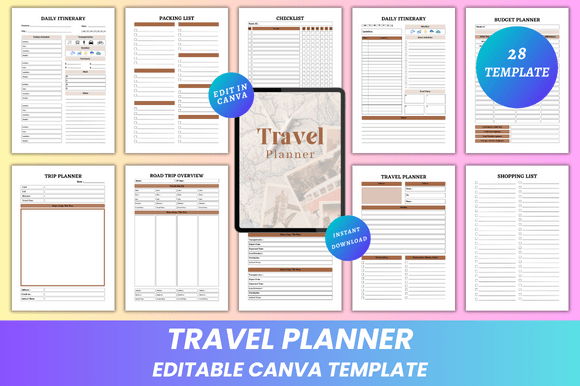
Most planner interiors fall into one of two traps: overly rigid templates that resist customization, or chaotic, unstructured files that demand design expertise. This one avoids both. Its 28-page structure balances thoroughness with breathing room—no filler, no redundancy. You’ll find smart dual-purpose sections like two unique Packing List pages (one checklist-style, one categorized), two distinct Notes layouts (one for quick jots, one for deeper reflection), and two Research Index spreads—one for destinations, one for logistics—so users don’t flip endlessly trying to cross-reference.
The design itself is clean and minimal—not sterile, but intentional. Ample white space supports readability. Thoughtful typography hierarchy guides the eye without shouting. Subtle lines, soft dividers, and consistent iconography create rhythm—not clutter. And because all elements are vector-based or high-res raster (JPG/PNG included), scaling or recoloring never sacrifices quality.
Real-World Use Cases—Beyond Just Printing
For self-publishers and KDP sellers, this interior accelerates launch timelines. Instead of hiring a designer or spending 40+ hours building layouts, you drop in your branding, tweak accent colors, swap fonts to match your cover, and export print-ready PDFs in under an hour. Many creators use the editable Canva link to build multiple versions—e.g., “Solo Female Traveler Edition” or “Van Life Budget Tracker”—without buying new templates.
Educators and workshop facilitators repurpose pages as teaching tools: the Daily Itinerary becomes a project timeline exercise; the Budget Planner doubles as a financial literacy worksheet; the Road Trip Overview helps students map historical routes or environmental studies. Since all files are editable, instructors add school logos, learning objectives, or QR codes linking to resources—all within Canva.
Freelance designers and agencies use it as a client-facing starter kit. Present the editable Canva link during onboarding, let clients rearrange sections or insert brand assets themselves, then refine only the high-value touches—like custom illustrations or localized currency fields. It cuts revision rounds and builds client confidence early.
Even non-commercial travelers benefit. That Accommodation spread? Fill it with Wi-Fi passwords, check-in times, and nearby coffee shops—then screenshot it for your phone. The Shopping List page? Paste in local market names before landing in Tokyo. Because it’s editable, it grows with your trip—not against it.
Practical Considerations Before You Customize
Start with purpose—not polish. Ask: Who’s using this? What decisions will they make while filling it out? A business traveler needs quick-access hotel info and expense categories; a gap-year student might prioritize hostel ratings and language phrases. Let function drive your edits—not just aesthetics.
When adjusting fonts in Canva, stick to Google Fonts available in the free tier unless you’ve upgraded. Some decorative typefaces won’t render correctly in exported PDFs. Likewise, avoid stacking too many transparent PNG layers—while beautiful on screen, they can cause unexpected flattening or color shifts when printed.
Test your final PDF at actual size. Zoom to 100% in Adobe Acrobat or Preview and scroll through each page. Check alignment on multi-column sections like Weekly Itinerary, verify checkbox spacing in Checklist, and confirm margins hold on all 28 pages. Small inconsistencies compound fast in print.
Why “Fully Editable” Isn’t Just Marketing Speak
Many templates claim editability—but deliver locked layers, flattened graphics, or missing fonts. With this Travel Planner Canva KDP Interior, every text box is live. Every icon is ungrouped and recolorable. Every photo frame accepts drag-and-drop uploads. Even the subtle grid lines behind Expense Tracker are separate, adjustable shapes—not embedded background images.
You’re not editing a picture of a planner—you’re editing the planner. That means swapping the default “USD” label for “EUR” or “INR”, adding a column for “Mileage Reimbursement”, or turning the Travel Journal page into a gratitude log with three daily prompts. It’s granular control, served simply.
And because you get lifetime access and instant download—no subscriptions, no expiring links—you can return months later to refresh a bestseller, localize for a new market, or adapt it for a client pitch. No re-purchasing. No waiting.
If you value time, clarity, and creative control—whether you’re launching your first KDP planner or supporting dozens of travelers with thoughtful tools—the Travel Planner Canva KDP Interior delivers where others compromise. It’s not just a template. It’s your foundation, ready to move at your pace.