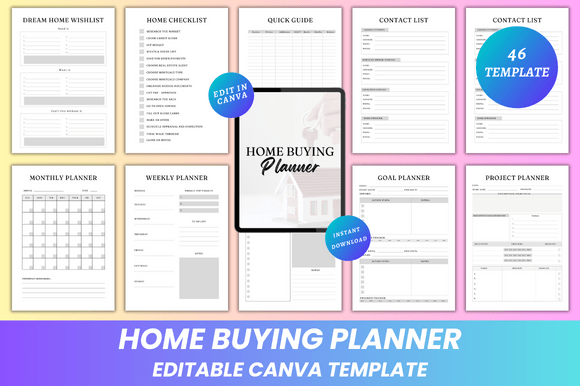
Home Buying Planner Canva KDP Interior
Buying a home is rarely just one decision—it’s hundreds. From tracking open houses and comparing mortgage rates to organizing renovation ideas and managing moving logistics, the process demands clarity, consistency, and calm. That’s where the Home Buying Planner Canva KDP Interior steps in: a thoughtfully structured, fully editable digital planner designed for real-life use—not just aesthetics.
This isn’t a static PDF you print once and abandon. Every page is built for active participation. You’ll receive an editable Canva link—no design skills required—so you can adjust fonts, resize sections, swap colors, rearrange layouts, or drop in personal photos of neighborhoods, floor plans, or dream kitchen inspo. Whether you’re typing notes on your phone during a showing or dragging and dropping renovation mood boards on your laptop, flexibility is baked in from the start.
Why This Planner Fits Different People—Differently
A recent grad saving for their first condo cares about simplicity and cost control. A small business owner buying a live-work space needs project timelines and expense tracking that sync with tax season. A real estate educator might use it as a teaching tool—annotating house scorecards with students or printing walkthrough checklists for role-play exercises. And a freelance interior designer helping clients buy? They’ll appreciate the Renovation Plans, Upgrades, and Vision Board pages—not as decoration, but as collaborative client-facing assets.
What stays consistent across all these uses is intentionality. The planner doesn’t assume you know what “house stats” mean—it defines them clearly on four dedicated pages. It doesn’t treat “things to consider” as vague advice—it breaks it into concrete categories: commute time, school zones, resale potential, noise levels, future development plans. Even the Breaker page (a gentle name for your deal-breaker list) invites specificity: “No basement flooding history,” “Must have laundry on main floor,” “Walkable to coffee shop.”
Beginners Get Clarity—Without Overwhelm
If you’ve never stepped foot in a listing without Googling “what’s a vapor barrier?” mid-tour, this planner helps you build confidence quietly. The Dream Home Wishlist starts broad (“natural light,” “quiet street”) and gently guides you toward measurable traits (“south-facing windows,” “300 ft from nearest highway”). The Quick Guide isn’t a textbook—it’s three pages of plain-language reminders: how to read a property disclosure, why earnest money matters, when to walk away from an inspection report.
The House Hunting List includes checkboxes for basics like “water pressure tested?” and “roof age verified?”—not because every buyer needs those answers on day one, but because the planner grows with you. You can hide rows, add custom fields, or duplicate pages for different neighborhoods. No re-downloading. No version confusion.
Experienced Buyers & Professionals Value Depth & Reliability
Veteran buyers often skip planners because they’ve “done this before”—until they’re juggling two offers, a lease expiration, and a contractor quote deadline. Here, the Project Planner and Monthly/Weekly/Daily Planners let you map out parallel timelines: loan approval milestones alongside paint sample deadlines, or utility transfer dates next to moving box inventory updates.
Real estate agents, financial coaches, or housing counselors use the Contact List (with two distinct layouts—one for service providers, one for personal referrals) and Expense Log to co-create transparency with clients. The Debt Payment Tracker integrates cleanly with pre-approval prep, while the Bucket List section helps clients articulate long-term goals beyond square footage—like “host Thanksgiving within 6 months” or “install rain barrels by spring.”
Creators & Small Business Owners See Commercial Potential
For Canva creators, educators, or KDP publishers, this planner is more than a tool—it’s a foundation. The clean, minimal design ensures readability whether printed at home or scaled for a 12x15” premium journal. The layered Canva file supports branding: swap in your logo on the Belongs To page, adjust color palettes to match your course materials, or export individual worksheets as lead magnets.
You’ll get high-resolution PDFs (print-ready, CMYK-optimized), plus JPG and PNG files—ideal for social media snippets, email headers, or website demos. No watermarks. No usage restrictions. If you sell coaching packages, bundle the Moving Day Planner and Utility Bills tracker as a “Post-Offer Support Kit.” If you run a blog on first-time home buying, embed the Walkthrough Checklist as a free download—then invite readers to upgrade to the full editable version.
Practicality Built Into Every Page
- Dream Home Wishlist — Not just “3 bedrooms,” but “master suite must fit king bed + dresser + reading nook.”
- House Scorecard — Rates each property across 9 weighted criteria (location, layout, condition, etc.), not just gut feeling.
- Renovation Plans — Includes space for sketches, vendor quotes, permit status, and budget vs. actual tracking.
- Moving Box Inventory — Label columns by room, contents, fragility level, and who packs it—no more “Where’s the toaster?” chaos.
- Vision Board — Drag-and-drop friendly for images, text overlays, and color swatches—no cropping or resizing headaches.
The Notes and Thank You pages may seem small—but they matter. Notes become searchable reference points later (“Why did we love #427 but pass on #428?”). The Thank You page? A quiet prompt to acknowledge everyone who helped—even if it’s just yourself.
Is This the Right Fit for You?
Ask yourself: Do you prefer editing live over re-typing spreadsheets? Do you value visual organization—like color-coded timelines or photo-based wishlists—as much as bullet points? Are you more likely to stick with a system that adapts to your voice than one that forces rigid templates?
If yes, the Home Buying Planner Canva KDP Interior aligns with how people actually work—not how productivity gurus say they should. It respects your time, your learning style, and your definition of “home.” You don’t need Canva Pro. You don’t need printing expertise. You do need something reliable, human-centered, and ready to grow with your journey—from first open house to keys-in-hand.