Pinterest Planner KDP Interior
Imagine opening a planner that doesn’t just track tasks—but actively supports your creative workflow, brand consistency, and publishing rhythm. The Pinterest Planner KDP Interior is built for that: a purpose-driven, print-ready interior designed specifically for creators who publish on Amazon KDP, run content businesses, or manage visual marketing across platforms like Pinterest.
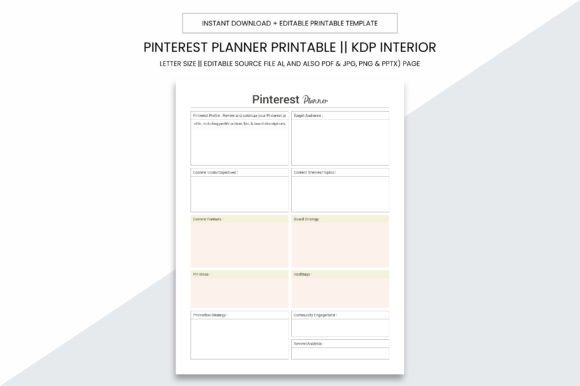
At its core, it’s more than a template—it’s a production-ready foundation. Measuring a clean, professional 8.5 x 11 inches with no bleed, it fits standard printing workflows without cropping surprises. Every page is optimized at 300 PPI for crisp, high-fidelity output—whether you’re proofing at home, sending to a local print shop, or uploading directly to KDP.
What Makes This Interior Stand Out?
Unlike generic planners, this interior is engineered for *actionable creativity*. It includes 109 fully laid-out PDF pages—each one structured to support real-world use cases: content calendars, pin idea banks, keyword trackers, seasonal campaign outlines, A/B test logs, and even thumbnail sketch grids. No blank pages waiting for inspiration—just intentional space where ideas gain shape and structure.
The digital download gives you flexibility without compromise: editable source files in Adobe Illustrator (.ai), plus universally compatible formats—PDF, JPG, PNG, and even PPTX. That means you can tweak colors for your brand palette, swap fonts for readability, adjust margins for specific printers, or drop individual pages into presentations for team briefings.
Creative Applications Across Roles
For KDP Publishers: Use the interior as a launchpad for low-content books—especially planners, journals, or niche workbooks targeting Pinterest-savvy audiences (think “Meal Prep Planner for Busy Moms” or “Small Business Social Media Tracker”). The 109-page count meets KDP’s minimum requirements while leaving room for custom covers and front/back matter. Because it’s print-optimized and bleed-free, you avoid common upload rejections—and get to market faster.
For Content Creators & Marketers: Treat each spread as a mini-brainstorming studio. One page might map out 12 pin variations for a single blog post; another logs engagement metrics alongside pin descriptions and link tracking. Since the layout is clean and uncluttered, it encourages focused ideation—not distraction. You’ll notice how quickly recurring themes emerge: seasonal hooks, trending keywords, or audience pain points you hadn’t connected before.
For Educators & Coaches: Adapt spreads into client-facing tools—like session prep sheets, goal-setting worksheets, or progress dashboards. The editable AI file lets you insert your logo, adjust headers for clarity, or add instructional notes in the margin. When shared digitally (as PDF) or printed for workshops, it feels cohesive and intentional—not generic.
Practical Tips for Getting Started
Start small. Pick *one* section that solves an immediate friction point—maybe your inconsistent pin scheduling or scattered content ideas. Print just those 5–7 pages. Use them for two weeks. Notice what works, what gets skipped, and where you instinctively add notes in the margins. That feedback loop tells you more than any feature list ever could.
Keep branding consistent—but not rigid. If you’re building a series of planners (e.g., “Productivity Bundle” or “Creator Toolkit”), use the same base interior but vary cover designs, color accents, and title treatments. Consistency builds recognition; variation keeps your offerings fresh and audience-specific.
When adapting for commercial use, remember: clarity trumps cleverness. Avoid overly decorative fonts in editable fields. Leave ample white space around checkboxes and input areas—especially if users will print and write by hand. Test print a few pages on your target paper stock (e.g., 70–100 lb text weight) to verify ink absorption and legibility.
Why Format Choice Matters
The inclusion of .ai, PDF, JPG, PNG, and PPTX isn’t about redundancy—it’s about control across stages of your process. Use Illustrator when you need pixel-perfect edits: adjusting grid lines, scaling icons, or aligning elements to a baseline grid. Export to PDF for final KDP uploads or client handoffs. Drop JPG or PNG versions into Canva or PowerPoint for quick social previews or pitch decks. Each format serves a distinct role in your creative pipeline.
And because there’s no bleed, you eliminate guesswork during trimming. What you design is what prints—no unexpected white borders or cut-off text. That reliability saves time, reduces reprints, and builds confidence when scaling from one planner to a full catalog.
Realistic Inspiration, Not Just Ideation
Here’s what actual users do:
- A freelance Canva designer uses the interior to prototype new planner concepts—testing layouts with real clients before investing in full development.
- A wellness coach bundles three adapted spreads (habit tracker, reflection prompts, weekly goals) into a lead magnet—then expands the full interior into a paid digital workbook.
- A small press repurposes the monthly overview pages to plan quarterly newsletter themes, aligning email content with Pinterest pin cycles and blog posts.
- An educator prints select pages double-sided, binds them into spiral notebooks for student use—and later converts the same files into a printable classroom resource pack.
None of these require advanced design skills. They rely instead on thoughtful adaptation: matching structure to intention, then refining based on real use.
Making It Your Own—Without Starting From Scratch
You don’t need to reinvent planning. You need a reliable, adaptable interior that respects your time and amplifies your voice. The Pinterest Planner KDP Interior delivers that balance: professional-grade specs paired with hands-on flexibility. It invites you to focus on *what* you create—not *how* to make the tool work.
Whether you’re launching your first KDP planner, streamlining your content calendar, or supporting clients with tangible resources, this interior meets you where you are. It’s not about perfection—it’s about momentum. Clear layouts. Reliable output. Room to grow.
So print a test page. Open the AI file. Try swapping one font. See how a small change shifts the feel—and then build from there.