Photography Planner Kdp Interior
Imagine opening a planner that doesn’t just track dates and deadlines—but actively supports your creative workflow, strengthens client communication, and streamlines production for print or digital publishing. The Photography Planner Kdp Interior is designed for exactly that: a functional, adaptable, and professionally crafted interior layout built for real-world use—whether you’re shooting portraits in your studio, managing commercial photo shoots, or launching your own KDP photography journal series.
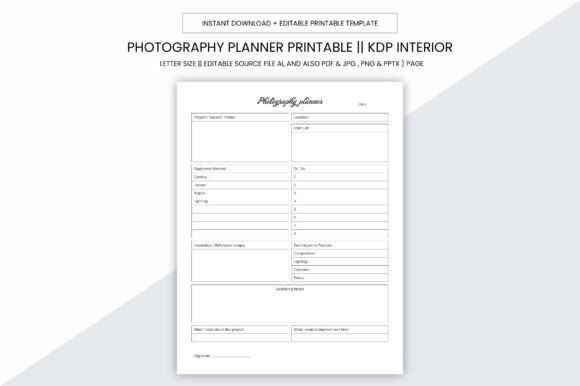
This isn’t a generic template. It’s a 109-page, print-ready PDF interior built with intention—structured to help photographers, designers, educators, and small business owners organize ideas, plan sessions, document gear and settings, track licensing and usage rights, and prepare clean, compliant files for Amazon KDP or local printing. Every page serves a purpose, and every detail—from sizing to resolution—is optimized for clarity and usability.
Why the 8.5 x 11 Inch Format Works So Well
The practical size—8.5 x 11 inches—strikes a deliberate balance. It’s large enough to accommodate detailed notes, exposure logs, shot lists, and contact sheet grids, yet compact enough to fit standard printers, binders, and KDP’s paperback requirements. There’s no bleed, which eliminates guesswork during trimming and ensures margins stay intact whether you’re printing at home, using a local print shop, or uploading directly to KDP.
This format also translates cleanly across platforms: use it as a physical logbook on set, convert pages into editable slides (PPTX) for client presentations, or extract individual JPG/PNG assets for social media previews or pitch decks. Its versatility starts with proportion—and ends with reliability.
What You Get—and How to Use Each File Type
You receive a full suite of source and output files—all editable and ready for action:
- AI (Adobe Illustrator): Modify layouts, swap fonts, adjust spacing, or rebrand colors for your studio or course materials.
- PDF (300 ppi): Print-ready for KDP upload or professional offset printing—crisp text, sharp grids, consistent alignment.
- JPG & PNG: High-resolution single-page exports ideal for embedding in websites, email newsletters, or teaching modules.
- PPTX: Turn planning pages into interactive workshop slides—e.g., “Lighting Setup Comparison” or “Client Questionnaire Flow.”
No extra software is required to start using the PDF version—but if you're building a branded product line, the AI file gives you full design control without starting from scratch.
Creative Applications Beyond the Obvious
Yes, it works beautifully as a personal photography logbook. But its real value shines when adapted to specific goals and audiences:
- For educators: Assign weekly “shoot planning” pages to students—tracking concept development, location scouting notes, and post-processing goals. Use the editable AI file to add school branding or learning objectives.
- For commercial photographers: Customize the “Client Brief Summary” and “Usage Rights Tracker” pages to align with contract terms—then export as PDFs for shared client folders or printed proposals.
- For KDP publishers: This interior is pre-formatted for Amazon’s guidelines—109 pages, correct margins, no bleed, CMYK-safe grayscale where appropriate. Pair it with your own cover design and publish as a standalone planner, a companion to your photography ebook, or a niche tool like “Pet Photography Session Planner.”
- For content creators: Pull individual pages—like the “Gear Checklist” or “Lighting Modifier Log”—and turn them into Instagram carousels or YouTube description templates.
How to Keep Your Output Clear, Consistent, and Audience-Friendly
Clarity begins with structure—and this interior delivers it. Pages follow a logical flow: session prep → on-set documentation → post-production tracking → delivery & feedback. That rhythm helps users avoid cluttered notes and inconsistent formatting.
To maintain consistency across uses:
- Stick to the built-in grid system when adding custom content—it preserves alignment and readability.
- Use the same font hierarchy (already embedded in AI/PDF) when editing headings or labels—no need to reinvent typography rules.
- When adapting for clients or students, annotate only what adds value—e.g., highlight key fields in yellow instead of overwriting entire sections.
- For KDP uploads, double-check Amazon’s latest interior requirements—even with no bleed, verify gutter width and trim size against current specs.
Originality comes not from changing everything—but from thoughtful, purpose-driven tweaks. A wedding photographer might add a “Vendor Contact Tracker” tab; a drone operator could insert a “Flight Log + Battery Rotation” chart. These aren’t deviations—they’re intelligent adaptations grounded in real work.
Realistic Examples You Can Start With Today
Here’s how three different users applied the Photography Planner Kdp Interior without needing design expertise:
- A freelance food stylist used the “Shot List + Styling Notes” page to map 12 variations of one dish—lighting angle, garnish swaps, plate textures—then exported each as a PNG to share with her client before the shoot.
- A community college instructor printed 20 copies, added her syllabus header to the AI file, and handed them out as course kits—students filled in “Concept Development” and “Feedback Reflection” pages weekly.
- A KDP publisher bundled the interior with a custom cover titled “Architectural Photography Field Guide,” added two blank index pages, and launched it as a low-content book—ranking organically for “architecture photo planner” within six weeks.
None required coding or advanced software. All leveraged the same foundation—just with attention to audience, context, and outcome.
Final Thought: Tools Should Serve Your Work, Not the Other Way Around
A great planner doesn’t ask you to change how you think—it supports how you already work. The Photography Planner Kdp Interior respects your time, your process, and your goals. Whether you’re logging ISO settings between takes, preparing a print-on-demand product, or helping others build confidence behind the lens, it meets you where you are—and gives you room to grow.
It’s not about perfection. It’s about having the right structure, at the right size, in the right format—so you spend less time formatting and more time creating.