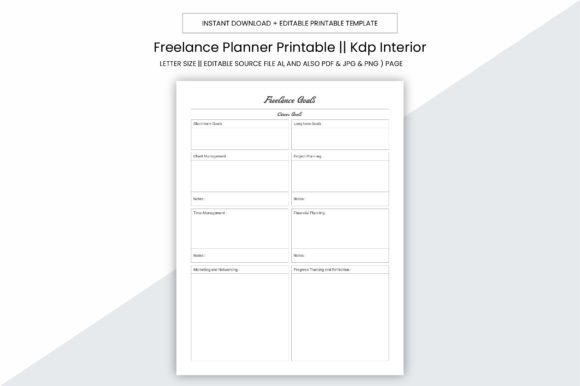
Freelance Planner Kdp Interior: A Purpose-Built Foundation for Real-World Planning
When you’re managing client deadlines, launching a new service, preparing a KDP book series, or balancing freelance work with personal goals, consistency in planning isn’t optional—it’s structural. The Freelance Planner Kdp Interior is not just another printable planner. It’s a production-ready interior file designed to integrate directly into your workflow—whether you're building a physical notebook for daily use, preparing a low-cost KDP paperback, or assembling a branded resource for clients or students.
At its core, this interior serves as a functional scaffold: 109 pages of thoughtfully structured layouts, delivered in high-resolution, print-optimized formats (PDF, JPG, PNG, PPTX, and editable Adobe Illustrator source files). Its 8.5 x 11 inch size matches standard US letter paper and most KDP paperback trim options—no bleed means clean margins, predictable printing, and zero layout surprises at the printer or on Amazon’s review dashboard.
How It Fits Into Your Workflow—Before, During, and After
Planning tools often get used only at the start of a project. The Freelance Planner Kdp Interior supports continuity across phases—not as a static artifact, but as an adaptable layer in your process.
Before a project: Use the editable AI file to customize headers, add your logo, adjust color schemes, or insert industry-specific trackers (e.g., client intake fields for designers, keyword research columns for SEO writers, or lesson objectives for educators). Because it’s fully editable, you’re not locked into someone else’s assumptions—you align the tool with your actual prep needs.
During execution: Print individual sections as needed—client onboarding checklists, content calendars, time audits, or pitch tracking logs. The no-bleed design ensures text and grids stay legible when printed on home or office printers. Many users print weekly spreads double-sided, bind them with a spiral coil, and keep them in a durable folder alongside contracts and reference materials.
After completion: Reuse pages as templates. Archive completed spreads digitally (scanned or saved from PDF), then duplicate and reset the original file for the next round. This reduces setup time between projects and builds a personal knowledge base—especially valuable if you’re iterating on service offerings, course frameworks, or publishing workflows.
Integration With Other Tools and Platforms
This interior doesn’t exist in isolation. Its value multiplies when paired intentionally with other assets and systems.
- KDP publishing: The 109-page PDF is formatted to Amazon’s exact specifications—including proper margins, gutter allowances, and font embedding. Upload it directly after adding your cover; no reformatting required. Test prints at home first using 300 ppi settings—this matches the DPI embedded in every included file, so what you see on screen is what ships.
- Digital note-taking: Import the PDF into apps like GoodNotes or Notability. Use the layered structure (headers, checkboxes, lined sections) with stylus support to annotate, highlight, or type over pages while retaining the underlying grid integrity.
- Team collaboration: Share the PPTX version with collaborators who don’t have Adobe software. Slide-based layouts let non-designers rearrange sections, add comments, or repurpose pages for internal training decks without breaking formatting.
- Client deliverables: As a small business owner or freelancer, offer a branded version of this planner as a lead magnet or upsell. Edit the AI file to reflect your brand voice, include your contact info in the footer, and bundle it with a short onboarding guide.
Practical Considerations for Long-Term Use
Usability isn’t just about aesthetics—it’s about how well a tool holds up across repeated use, changing priorities, and evolving skill levels.
The Freelance Planner Kdp Interior prioritizes clarity over decoration. Lines are crisp, spacing is generous, and fonts are optimized for both screen reading and ink-on-paper legibility. There’s no hidden “flourish” that eats up usable space or confuses scanners. That matters when you’re reviewing handwritten notes later or converting pages to searchable PDFs.
Consistency also comes from structure. Pages follow logical groupings—goal setting before task breakdowns, reflection prompts after weekly reviews, budget trackers adjacent to income logs. You don’t need to relearn where things live each time you open the file. That muscle memory saves minutes per session, which compounds over weeks and months.
For those managing multiple roles—freelancer + educator + content creator—the modular nature helps. Pull out the “Project Launch Timeline” page for a new course, pair it with the “Content Batch Planner” for video scripts, then slot both into a single binder. No need to toggle between five different apps or documents.
Getting Started Without Overhead
You don’t need design experience to begin. Start with the PDF—print one week’s worth of pages, try them during a real client call or writing sprint, and observe where friction appears. Did you run out of space in the daily priority section? Did the meeting notes template lack room for action items? That feedback informs how you’ll use the AI file next time—adding a second column, adjusting line height, or inserting a signature line for approvals.
If you're preparing for KDP, test-print the first and last three pages. Check alignment, contrast, and margin visibility. Then upload the full PDF and run Amazon’s automated preview tool. Because this interior was built with KDP’s current guidelines in mind—including correct spine width calculations for common page counts—you’ll avoid rejection loops tied to formatting errors.
For educators or trainers, consider printing select pages on cardstock and laminating them for reusable workshop handouts. The 300 ppi resolution ensures sharp text even when enlarged or photocopied for classroom distribution.
Who Benefits—and Why It Sticks
This isn’t aimed at people who want “motivation.” It’s for those who need precision, repeatability, and quiet reliability.
A freelance graphic designer uses the “Client Feedback Tracker” page to log revision rounds across three simultaneous projects—reducing miscommunication and scope creep. A blogger repurposes the “Idea Validation Grid” to score post concepts against audience demand, SEO potential, and production time before writing a single word. A small press publisher bundles the interior with custom covers to create niche-planning journals for writers—turning a digital download into recurring revenue.
What makes the Freelance Planner Kdp Interior sustainable is its neutrality. It doesn’t impose a productivity philosophy. It provides infrastructure—space, sequence, and structure—so you can apply your own judgment, methods, and priorities without fighting the tool.
Over time, users report less time spent formatting, fewer missed steps in client handoffs, and clearer visibility into where time actually goes. That’s not because the planner “fixes” discipline—it’s because it removes ambiguity from the act of recording, reviewing, and acting.
If your current system involves juggling sticky notes, half-filled notebooks, and scattered Google Docs, this interior offers a grounded alternative: one consistent, printable, editable, KDP-ready foundation—ready to support your work exactly as you do it.