Business Expense Tracker KDP Interior
A Business Expense Tracker KDP Interior isn’t just another printable—it’s a precision-crafted, production-ready tool built for small business owners and creators who need clarity without complexity. Designed specifically for Amazon KDP publishing, this 120-page digital notebook delivers structure, consistency, and professional-grade formatting in one seamless PDF file. It’s not a template you’ll spend hours customizing. It’s a fully tested, print-optimized interior you upload directly to KDP—and start selling.
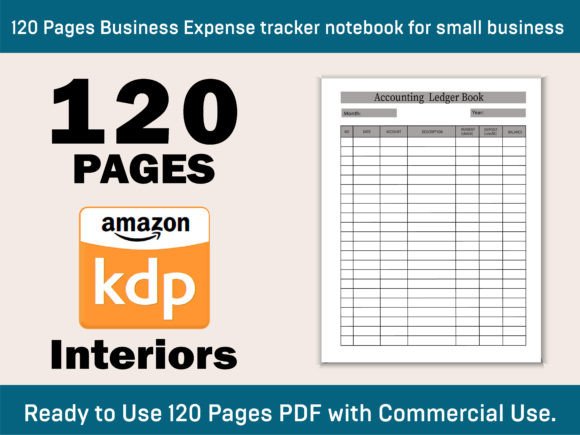
At its core, the Business Expense Tracker KDP Interior supports disciplined financial tracking from day one of operation. Each page includes dedicated fields for Month, Year, Date, Account, Description, Payment (Debit), Deposit (Credit), and Running Balance. That structure isn’t arbitrary—it mirrors standard double-entry logic while remaining intuitive enough for non-accountants. Whether you’re invoicing clients, reimbursing supplies, paying contractors, or logging mileage, every transaction lands in a consistent, audit-ready format.
How It Fits Into Real Business Workflows
This interior doesn’t sit on a shelf waiting for “someday.” It integrates immediately into active business rhythms. Before launching a new service offering, for example, many freelancers use the first 10–15 pages to log startup costs—domain registration, software subscriptions, branding assets—establishing a baseline for profitability analysis later. During ongoing operations, it becomes a daily checkpoint: five minutes at closing time to record that $42.50 QuickBooks subscription renewal or the $89 client deposit received via Stripe. No syncing, no app dependency—just direct, tactile entry aligned with your actual cash flow cadence.
After quarterly tax prep, users often revisit earlier pages to cross-reference entries against bank statements or exported CSV files. Because the layout is clean, linear, and uncluttered—no decorative borders, no distracting graphics—the eye moves quickly across columns. That visual efficiency reduces reconciliation time significantly compared to handwritten notebooks or fragmented spreadsheets.
Compatibility and Technical Readiness
The Business Expense Tracker KDP Interior ships as a single, high-resolution PDF—no layered PSDs, no editable InDesign files. It’s sized precisely to KDP’s 8.5″ x 11″ standard with zero bleed, meaning no content gets trimmed during printing. At 300 DPI, it meets KDP’s quality threshold for sharp text and crisp grid lines—even when printed on standard office paper or premium matte stock. Every page has been preflighted: fonts are embedded, margins align with KDP’s minimum requirements, and pagination flows correctly across left/right spreads.
This eliminates guesswork. You won’t encounter KDP warnings about low-res images, missing fonts, or margin violations. There’s no need to adjust spacing, re-export, or troubleshoot alignment—because the file was built to pass KDP’s automated checks on first upload. For creators managing multiple KDP titles, that reliability compounds: less time debugging, more time optimizing listings or expanding product lines.
Integration With Broader Financial Systems
While the tracker functions independently, its real strength emerges in how it complements—not replaces—other tools. Many users pair it with QuickBooks or Xero by using the notebook for field capture (e.g., noting vendor names and amounts during in-person meetings) and then batch-entering those details later into their accounting software. Others treat it as a primary ledger and export monthly summaries to Excel for charting trends—average monthly software spend, seasonal variation in marketing costs, or contractor payment frequency.
Because each entry includes both debit and credit columns plus an auto-updating balance line, reconciling against bank feeds becomes faster. If your checking account shows a $1,247.32 ending balance and your tracker ends at $1,246.82, you know within seconds whether the discrepancy lies in a missed entry, a transposition error, or a pending transaction—no need to retrace dozens of rows.
Practical Implementation Tips
Start small, scale intentionally. Don’t feel pressured to fill all 120 pages before launch. Begin with 3–6 months’ worth of expense categories relevant to your business model—e.g., “Web Hosting,” “Contractor Fees,” “Travel,” “Office Supplies.” As your operations evolve, add new categories mid-notebook; the clean columnar design accommodates that flexibility.
Use consistent naming conventions. Enter “Gmail” instead of “Google Mail” or “G-Suite”; write “Canva Pro” rather than “Canva Subscription.” Uniformity makes future filtering and review more reliable—especially if you later scan or transcribe entries.
Leverage the balance column proactively. Don’t wait until month-end to verify totals. Check the running balance after every third or fourth entry. A sudden unexpected dip may flag a misplaced debit/credit—or reveal a pattern worth investigating (e.g., recurring late fees).
Store completed notebooks securely—but accessibly. Once a notebook is full, scan it as a PDF and store it in a dated folder labeled “Expense Tracker – Q3 2024.” Keep the physical copy in a fireproof filing box. This dual-archive approach satisfies both IRS documentation standards and your own operational peace of mind.
Long-Term Usability and Consistency
Unlike apps that change interfaces or require subscriptions, this interior remains unchanged year after year. The same layout you used in 2023 works identically in 2025—no learning curve, no version confusion. That stability supports habit formation: when the structure stays constant, tracking becomes automatic, not optional.
It also scales cleanly across team members. If you onboard a VA or bookkeeper, they can pick up the notebook and begin entering data immediately—no training videos, no login credentials, no platform-specific quirks. Just clear headings and logical sequencing.
For publishers building a catalog of KDP interiors, this tracker serves as a foundational SKU. Its evergreen utility means steady backend sales—not viral spikes followed by long droughts. Customers return not for novelty, but for reliability. They buy again because last time, the file uploaded without error. Because their customers praised the clean layout. Because it simply worked.
Why This Design Stands Out
Many expense trackers overload pages with redundant prompts, decorative icons, or unnecessary sections (“Notes,” “Attachments,” “Priority Level”). This interior avoids that noise. Every element serves a functional purpose: the date field enables chronological sorting; the account column supports category-based reporting; the dual-column debit/credit layout enforces accounting discipline.
It’s also designed for legibility under real-world conditions—whether you’re jotting notes in a coffee shop with a fine-tip pen or filling entries at home with a gel ink rollerball. The font size is large enough for comfortable reading, yet compact enough to fit 30+ entries per page without crowding.
If you’re evaluating this Business Expense Tracker KDP Interior alongside alternatives, ask two questions: Does it eliminate friction in my current process? And does it remain useful six months from now? This interior answers yes—to both.
Follow the creator’s profile for updates—not just new designs, but iterative refinements grounded in real user feedback: subtle spacing tweaks, additional summary pages, or expanded category suggestions based on common small business models. These aren’t cosmetic changes. They’re workflow enhancements, tested and validated where it matters most—in daily use.