2024 Teacher Planner Canva KDP Interior: A Fully Customizable, Print-Ready Foundation for Educators and Creators
For educators, curriculum designers, freelance education consultants, and independent creators launching digital planner products on Amazon KDP, the 2024 Teacher Planner Canva KDP Interior represents more than a template—it’s a production-ready, pedagogically grounded framework built for flexibility, fidelity, and function. Unlike static PDFs or rigid design files, this interior is engineered from the ground up for seamless editing in Canva—without sacrificing print quality, structural coherence, or classroom utility. Its value lies not only in what it includes, but in how each component invites intentional adaptation: whether you’re tailoring it for a Montessori preschool lead teacher, aligning it with IB Middle Years Programme timelines, or repurposing its layout logic for a homeschool co-op coordinator’s shared planning hub.
Why Editability in Canva Transforms Planning Workflows
The defining strength of the 2024 Teacher Planner Canva KDP Interior is its native Canva compatibility—not as an afterthought, but as a core design principle. Every page—from the Belongs To cover insert to the December Snapshot 2024 reflection spread—is constructed using Canva’s responsive text boxes, grouped layers, and vector-friendly elements. This means fonts scale without pixelation, color palettes shift globally with one palette edit, and layout grids reflow intelligently when resizing sections for differentiated needs (e.g., enlarging the Medical Information table for special education use cases). Unlike flattened Illustrator files or locked PDFs, this interior supports iterative refinement: swap out the default serif heading font for a dyslexia-friendly sans-serif, adjust spacing in the Weekly Lesson Plan grid to accommodate bilingual lesson notes, or embed student-facing QR codes directly into the Online Information page—all without design software expertise.
This level of control matters most during implementation. A K–5 art specialist might collapse the dual-column Class Schedule into a single vertical timeline to track rotating studio rotations. A high school AP Biology teacher could duplicate the Assignment Tracker and rename columns to reflect lab report drafts, peer reviews, and rubric-aligned revisions. Because the editable Canva link delivers full layer access—not just text fields—the structure remains intact even after substantial customization.
Print-Ready Output That Meets Real-World Production Standards
While Canva editing enables agility, the final deliverable must perform reliably across physical and digital channels. The 2024 Teacher Planner Canva KDP Interior ships with high-resolution, press-ready assets: crisp 300 DPI PDFs formatted precisely to 8.5 × 11 inches (letter size), plus layered PNG and JPG exports for hybrid workflows. These aren’t downscaled web previews—they’re bleed-free, CMYK-optimized, and kerning-verified files tested against KDP’s latest interior validation rules (including margin safety zones and image embedding protocols). When uploaded to Amazon KDP, the PDFs pass automated checks on first attempt; when printed locally, they render consistently on both inkjet and laser printers—critical for educators who print weekly spreads at home or bind quarterly planners at office supply shops.
Importantly, the interior avoids common pitfalls that derail print projects: no transparent PNG overlays that vanish on KDP’s grayscale preview, no unembedded fonts that default to Times New Roman mid-spread, and no low-res icons that blur in the Theme Tracker or Classroom Volunteers charts. Each graphic element is either vector-based or exported at minimum 2× resolution, ensuring clarity even when zoomed for IEP documentation or parent conference handouts.
Functional Depth Across Teaching Contexts—Not Just Checklists
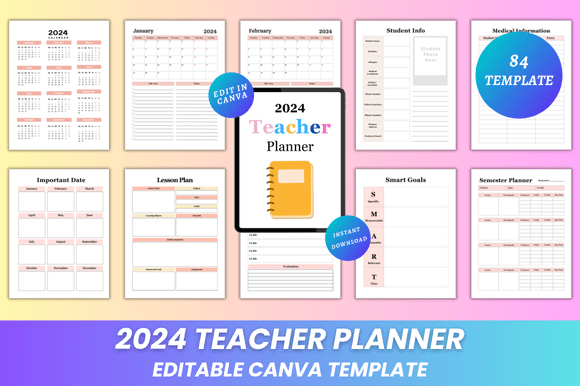
Beneath its polished surface, the 2024 Teacher Planner Canva KDP Interior embeds nuanced pedagogical scaffolding. Take the Smart Goals section: rather than generic goal-setting prompts, it structures objectives using the S.M.A.R.T. acronym with embedded reflection cues (“What evidence will show progress by March?”) and space for baseline data entry—aligning with growth-mindset frameworks used in RTI Tier 1 interventions. Similarly, the Reading List isn’t a blank list—it includes columns for Lexile range, genre coding, and read-aloud status, supporting balanced literacy planning across grade bands.
The Transportation Information Log goes beyond names and bus numbers: it reserves rows for allergy alerts, drop-off/pick-up authorization notes, and weather-related contingency plans—details often missed in generic planners but essential for paraprofessionals managing dismissal logistics. Even the Seating Chart uses a modular grid system that accommodates U-shaped, horseshoe, or flexible grouping configurations, with editable labels for behavior support tags (e.g., “focus partner,” “quiet signal reminder”) rather than static seat numbers.
For creators building niche KDP products, this functional richness serves dual purposes: it provides immediate usability for end users, while also offering reusable, branded components. A STEM educator launching a “Physics Lab Planner” can extract and rebrand the Lesson Planner and Exam Schedule pages, then integrate lab safety checklists and equipment calibration logs—leveraging the underlying architecture without rebuilding from scratch.
Workflow Integration Beyond the Page
A truly effective teacher planner doesn’t exist in isolation—it connects to broader systems. The 2024 Teacher Planner Canva KDP Interior anticipates these intersections. The Website Login section includes dedicated fields for LMS credentials (Google Classroom, Canvas, Seesaw), district portal URLs, and password reset reminders—structured to minimize cognitive load during chaotic back-to-school setup. The Important Date spread features dual-calendar alignment: major national education observances (e.g., National School Psychology Week) appear alongside customizable local dates (district PD days, building fire drill schedules), reducing cross-referencing friction.
Even the Semester Planner and Semester Plan spreads are designed for backward mapping: the former outlines macro-level pacing (unit durations, benchmark assessment windows), while the latter drills into weekly competencies, aligned standards, and formative assessment types—enabling seamless translation into scope-and-sequence documents required by curriculum committees. When paired with the Lesson Plan pages (which include editable standards dropdowns and differentiation strategy prompts), the interior forms a cohesive instructional design loop—not just a record-keeping tool.
Strategic Considerations for Different Users
Educators evaluating this interior should assess not just content coverage, but adaptability under pressure. Does the Daily Planner allow quick annotation during hallway conversations? Yes—the time blocks use generous line height and light gray ruling, optimized for rapid pen-in-hand entries. Does the Attendance Log support multi-class tracking? It includes optional class tabs and color-coded absence reason keys (illness, field trip, excused tardy), scalable across departmental teaching loads.
For KDP sellers, the interior’s modularity unlocks scalable product lines. The January Snapshot 2024 – December Snapshot 2024 pages—each featuring monthly reflection prompts, growth metrics, and student spotlight sections—can be extracted and sold as standalone “Teacher Reflection Journals.” The Class List and Student Info spreads, with GDPR-compliant blank fields and optional FERPA disclaimer footers, serve as compliant templates for international sellers targeting EU or Canadian markets.
Researchers studying teacher workload might analyze how the Homework Tracker’s dual-axis design (assignment type × due date × completion rate) surfaces patterns in assignment load distribution—data that informs professional development on equitable workload practices. Hobbyist planners, meanwhile, appreciate the Helpful Hints section: practical, non-prescriptive tips like “Batch grade similar question types” or “Use sticky notes for real-time feedback”—tested by veteran teachers, not generated by AI.
Final Thoughts on Sustainable Use
The longevity of any teacher planner hinges on its capacity to evolve with practice—not just across months, but across careers. The 2024 Teacher Planner Canva KDP Interior meets this need through deliberate design economy: no redundant pages, no decorative fluff, and no locked branding that limits resale potential. Its clean typography hierarchy ensures readability after years of coffee-stained revisions; its consistent iconography (all custom-designed SVGs, not clipart) maintains visual coherence even after dozens of edits; and its logical section sequencing—from foundational identity (All About Me) to daily execution (Daily Planner) to reflective synthesis (December Snapshot 2024)—mirrors how experienced educators actually think through their year.
In an era where burnout stems less from lack of tools and more from tools that demand constant workarounds, this interior offers something rare: authority without rigidity, completeness without clutter, and professionalism without pretense. It doesn’t tell teachers how to teach—it gives them the precise, adaptable, print-perfect scaffolding to teach exactly as they intend.